Photograph. Book. Done.
Receipts, invoices, bank and cash-basis accounting (EÜR) for the self-employed. And you ask the app how your books stand.
If something is unclear, the app asks once.
What fiac.ai does differently
Less to check, more done.
- 01
A note, not a pile
fiac.ai books by fixed rules. If something is unclear, a note goes on the receipt and the receipt does not get stuck. That keeps the “Check” folder almost empty.
- 02
The whole stack at once
One scan with many pages is enough. Multi-page invoices stay together, duplicate receipts go to their own folder, and of several reminders only the newest counts.
- 03
Booked so you can follow it
The AI reads the receipt, booking follows fixed rules. Every booking has an audit trail, and corrections are made as reversing entries in the right month.
Compared
What the providers state on their own websites.
| fiac.ai | Lexware Office | sevDesk | BuchhaltungsButler | Accountable | |
|---|---|---|---|---|---|
| Create an invoice by dictation | |||||
| Join multi-page invoices in a scanner stack | |||||
| Match incoming reminders to the original invoice | |||||
| Set per task what the software does on its own | |||||
| Ask about your own figures in plain language | |||||
| Write off bad debt | |||||
| Full-text search in receipt text | |||||
| Quote, order and invoice as one chain | |||||
| Receipts by email to your own receipt address | |||||
| Create XRechnung e-invoices | |||||
| Match bank transactions to invoices | |||||
| Cash-basis accounts (EÜR) and DATEV export |
offered according to the provider’s website not stated on the provider’s website
Sources and date (16 Nov 2026)
We only checked the providers’ own websites and help pages, as of 16 Nov 2026. Offers change. Please report errors to [email protected] and we will correct them right away. Trademarks belong to their owners.
- Lexware Office: https://www.lexware.de/funktionen/
- Lexware Office: https://www.lexware.de/funktionen/belegerfassung/
- Lexware Office: https://help.lexware.de/de-form/articles/617012-automatischen-belegempfang-per-e-mail-einrichten
- Lexware Office: https://www.lexware.de/funktionen/lexware-mcp/
- Lexware Office: https://help.lexware.de/de-form/articles/548869-uneinbringliche-forderungen-ausbuchen
- Lexware Office: https://www.lexware.de/funktionen/auftragsbestaetigung-schreiben/
- Lexware Office: https://www.lexware.de/funktionen/automatisierte-buchhaltung/
- Lexware Office: https://www.lexware.de/funktionen/einnahmenueberschussrechnung/
- sevDesk: https://sevdesk.de/funktionen/
- sevDesk: https://sevdesk.de/produktuebersicht/
- sevDesk: https://sevdesk.de/apps/
- sevDesk: https://sevdesk.de/faq/
- sevDesk: https://hilfe.sevdesk.de/de/articles/9453113-belege-erfassen
- BuchhaltungsButler: https://www.buchhaltungsbutler.de/funktionen/
- BuchhaltungsButler: https://www.buchhaltungsbutler.de/automatisierte-buchhaltung/
- BuchhaltungsButler: https://www.buchhaltungsbutler.de/buchhaltungssoftware-dienstleistungsunternehmen/
- Accountable: https://www.accountable.de/
- Accountable: https://www.accountable.de/preise/
- Accountable: https://www.accountable.de/ki-steuerberater/
- Accountable: https://www.accountable.de/help-center/fuege-deine-ersten-belege-hinzu/
- Accountable: https://www.accountable.de/help-center/wie-kann-ich-e-rechnungen-versenden/
- Accountable: https://www.accountable.de/help-center/datev-export-in-accountable/
- Accountable: https://www.accountable.de/en/help-center/manage-links-between-expenses-and-bank-transactions/
Receipts arrive on their own
Photograph, upload or forward.
Email to your receipt address. Retyping. Done.
Every company has its own receipt address at fiac.ai. If you like, the mailbox only accepts emails from approved senders.
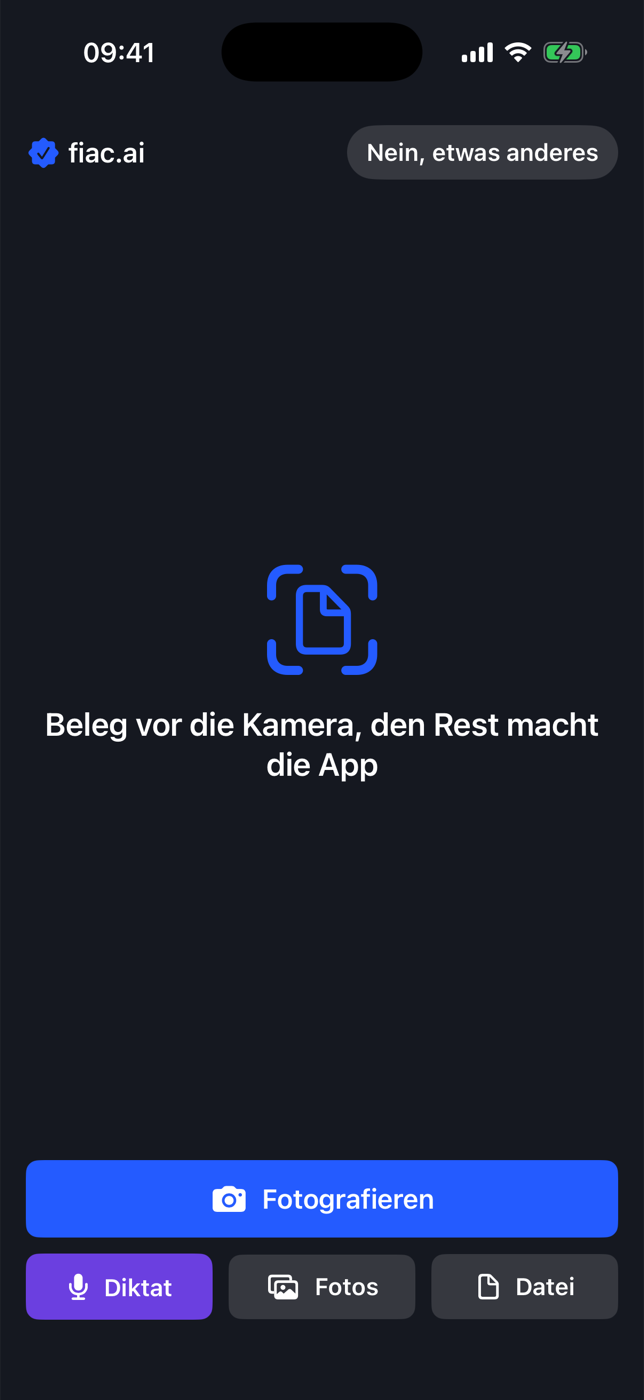
Three ways in
A photo with the app for iOS and Android, an upload in the browser, or forwarding to the company's own receipt address.
fiac.ai recognises the document type
Invoice, credit note, reminder, contract, tax assessment and more. Receipts scanned twice go to the “Duplicates” folder and are not booked.
Whole scanner stacks
fiac.ai joins pages marked “page 2/5” into one receipt. If a page is missing, a note goes on the receipt. Small receipts without a date get the date of the neighbouring receipt from the same batch.
Search the full receipt text
Search finds everything printed on a receipt, even numbers without spaces. Under “Create” you can make a self-issued receipt, a rent confirmation or an entry certificate for EU deliveries.
Inbox of the receipt address
For each email you can see what arrived, what became of it and what is stuck, with the reason.
Booking with a question instead of guessing
When something is unclear, fiac.ai asks.
A proposal from the receipt
fiac.ai reads amount, tax, supplier and date and proposes the booking. When something contradicts, a short question comes up that you answer directly in the overview.
Audit trail for every booking
Who, when, why: everything is traceable. Locked months stay unchanged, corrections go through reversal.
Invoices, quotes, orders
From the enquiry to the payment.
One continuous chain
Quote, order and invoice are linked. From "accepted" to the order is one click. Own number sequences, credit notes and reversals with their own number, down payment and final invoices, recurring invoices.
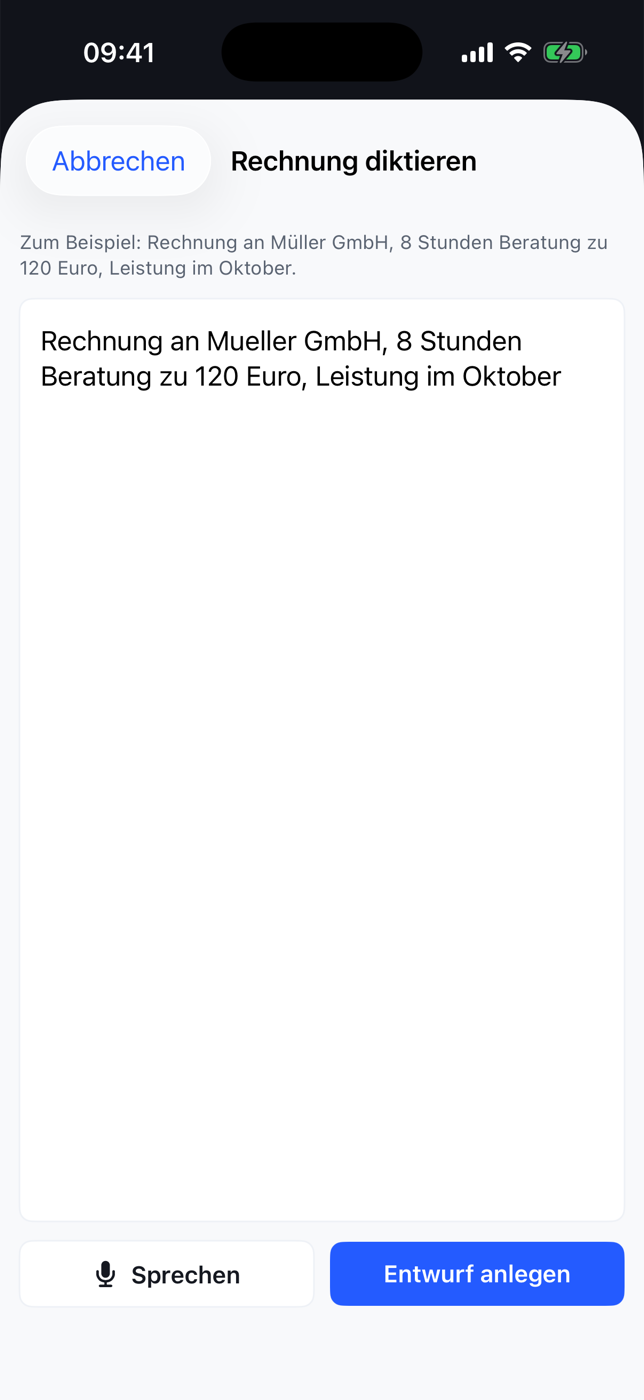
Invoice by dictation
"Meier, painted wall, 10 square metres" becomes a finished draft. Invoices and quotes are also available in English.
XRechnung and GiroCode
The XRechnung passes the official KoSIT validator (XRechnung 3.0.2). The PDF carries a GiroCode that the customer uses to pay with a banking app.
Sent invoices stay unchanged
When you send an invoice, fiac records the recipient, your company details and the PDF. Later changes to your master data do not change an old invoice. Corrections go through reversal or credit note. Unfinished invoices are saved automatically while you type.
Bank and open items
Payments find their invoice.
Matching the transactions
If the invoice number is in the payment reference, the payment is already pre-filled. Partial payments, cash discounts and several invoices in one payment are possible.
Open items and dunning
For customers and suppliers, with dunning levels. fiac.ai matches incoming reminders with the original invoice and the bank. Per contract only the newest reminder counts, and reminder fees are booked as costs.
Bad debt in one click
If a customer will not pay, you write the invoice off in one click. Revenue and VAT are corrected in the right month.
Automation you set up
You decide what fiac.ai does on its own.

Off, with a question or on its own
You set this per type of task: reminders, recurring invoices, following up on quotes, the daily overview. Payments, tax returns and legal letters always run with a question.
Daily overview with hints
By email and in the portal, based on fixed rules: order completed and not billed, supplier clearly more expensive than usual, monthly invoice missing, notice period of a contract approaching.
Questions about your own numbers
What is still open? What came in this month?
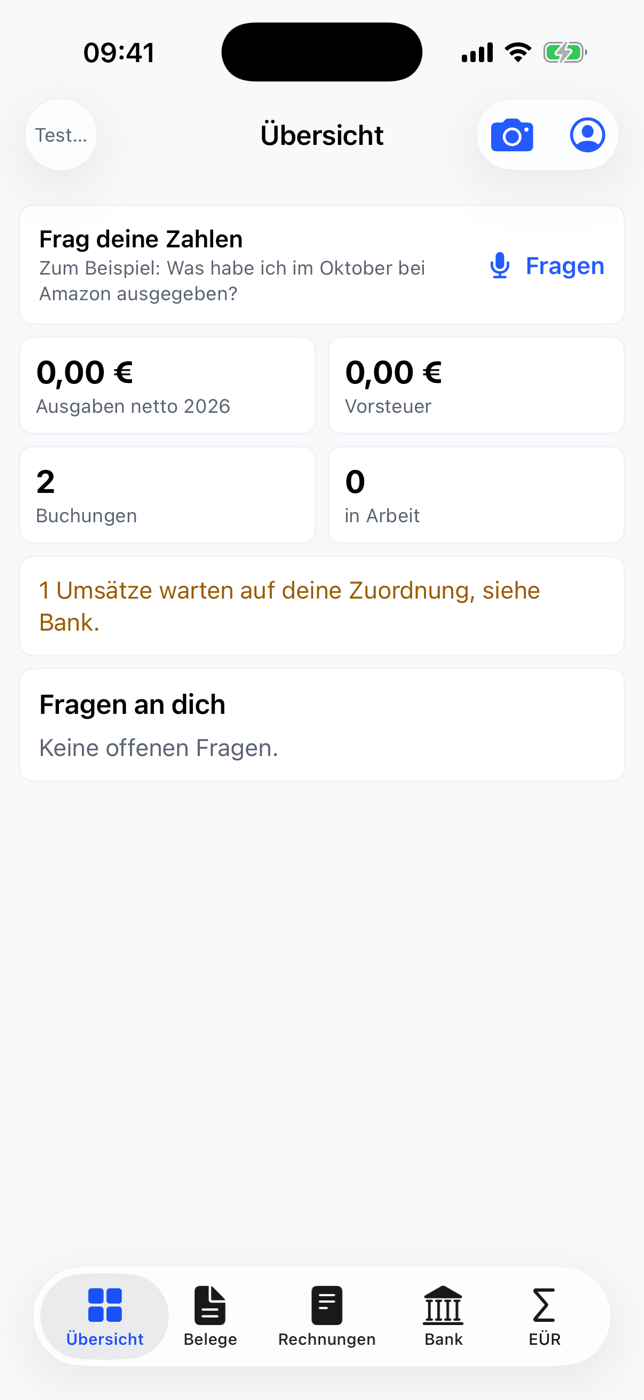
Answers from booked data
The assistant calculates from your bookings and does not estimate.
Metrics on automation
Share of receipts handled fully automatically, corrections, turnaround time and AI cost per receipt.
Accounting up to the tax
At the end of the month everything is ready.

Journal to VAT return
Journal, EÜR with Anlage EÜR, VAT return as values, recapitulative statement, cash book with daily closing, fixed assets with depreciation, travel expenses and entertainment.
Handover to the tax advisor
DATEV handover, procedure documentation in the product and export of the whole client.
Collaboration and security
Each company sees only its own data.
Roles
Owner, employee and tax advisor, who can only read.
Sign-in and backup
Two-factor sign-in with an authenticator app and recovery codes. Daily data backup.
Try it
The portal runs as a test system with synthetic receipts. A review of the tax points by a tax advisor is still pending.
Android app
The Android app is available as a test version to download. It is not in the Play Store.
Test version 1.1, 1.8 MB.
Checksum for the technically minded
SHA-256: 0c616791df30a9f18a19c234d7b93521b7c9236c7b444da5150515e56dfc13fcInstallation
- Download the file on the Android device and open it.
- Android asks whether installing from an unknown source is allowed. In the prompt, allow the installation for this browser or file manager.
- Install and open the app. Sign in with a test account of the portal.
The app is a test version and works with synthetic receipts only.
fiac.ai on your computer
Download for Mac now, Windows is coming.
Your receipt folder Mac Windows coming
You pick one folder per company. It holds receipts, invoices and “Zu klären” (to sort out) as copies from fiac.ai, always up to date. What you don’t need on the Mac you deselect, it stays in the cloud. On the computer, receipts, invoices and “Zu klären” are read-only, only “Upload” is open.
fiac.ai as a drive Mac Windows coming
In addition, fiac.ai shows up in Finder as a drive. A double-click opens the original.
Version 0.3.5 for macOS 13 and newer.
Checksum for the technically minded
SHA-256: 44d7add159d535410477c2fc54d9b7e2f279537b58e41b0120bea9052a29a80eSet up
- Open the downloaded file and drag fiac into the “Applications” folder.
- Start fiac. It sits in the menu bar at the top and in the Dock.
- In the menu choose “Firma hinzufügen” (add company), sign in to fiac in the browser, confirm this computer and pick the folder.
- Done. Put new receipts into “Upload” or drag them onto the fiac window.
The drawings show the layout and are not screenshots.
Contact
Questions about the portal or interested in the test system? Write to us, we reply by email.